

Improving your website’s visibility on Google does not always require expensive SEO software, paid advertising, or hiring a professional agency. Many important search engine optimization techniques can be implemented without spending money, especially if you are willing to invest time in understanding how search engines work. “How to improve website SEO without spending money“
For beginners, SEO can initially seem complicated. You might publish useful articles, create an attractive website, and still struggle to attract visitors from Google. This often happens because search engines need clear signals to understand your website’s content, structure, and purpose.
The good news is that several effective SEO improvements are completely free.
Google provides useful tools for monitoring search performance, checking indexing problems, and identifying technical issues. You can also improve your website by writing helpful content, optimizing page titles, organizing internal links, and making your pages easier to navigate.
However, SEO is not an overnight process. Even after making improvements, search engines may take time to crawl your pages, process changes, and reassess their relevance.
In this guide, you will learn 12 practical ways to improve your website’s SEO without spending money. These techniques are suitable for bloggers, small business owners, WordPress users, and anyone managing a website with a limited budget.
1. Understand How Google Search Works
Before making changes to your website, it is important to understand how Google discovers and displays web pages.
Google Search generally involves three major processes: crawling, indexing, and serving search results.
During crawling, automated programs called crawlers discover publicly accessible pages by following links and using other discovery methods. Once a page is discovered, Google may analyze its content and store relevant information in its search index.
When someone searches for information, Google’s systems evaluate available pages to identify results that may best satisfy the user’s query.
However, not every discovered page is guaranteed to be indexed, and indexing does not guarantee a high ranking.
For example, imagine that you publish an article explaining how to create a WordPress website. If Google cannot access the page because of a technical restriction, your content may never become eligible to appear in normal search results.
Similarly, if your article provides little useful information compared with other available resources, it may struggle to perform well.
Understanding these fundamentals helps you focus on meaningful improvements instead of searching for shortcuts.
You can learn more from Google’s official documentation:
2. Set Up Google Search Console
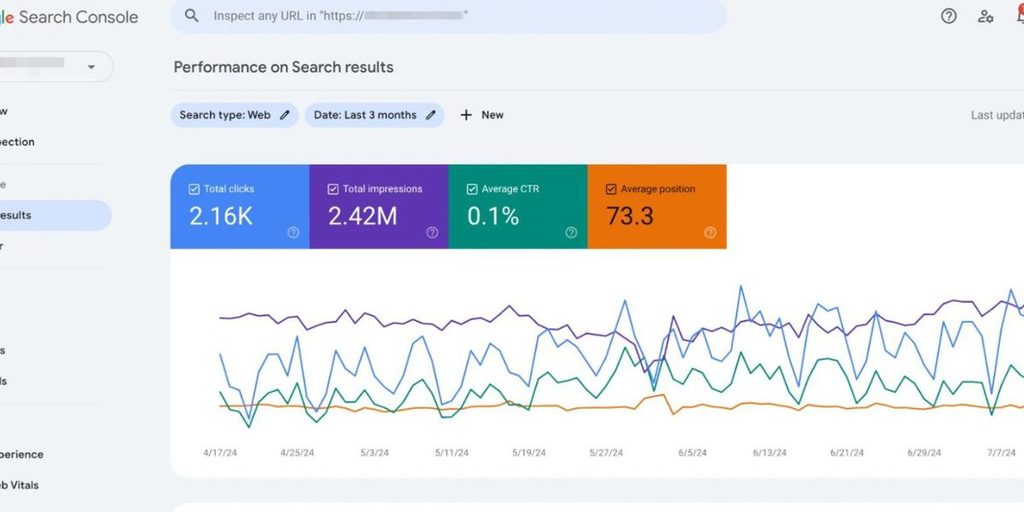
Google Search Console is one of the most valuable free tools available to website owners.
It allows you to monitor how your website performs in Google Search and identify potential problems affecting its visibility.
Unlike many third-party SEO platforms, Search Console provides information directly from Google’s own systems.
After connecting your website, you can examine search queries, impressions, clicks, indexing status, and other useful information.
For example, suppose your website receives 5,000 search impressions but only 80 clicks during a particular reporting period. You can investigate which queries generate impressions and whether the pages appearing for those searches match what users expect.
This information can help you identify opportunities to improve page titles, descriptions, and content relevance.
How to Set Up Google Search Console
- Visit Google Search Console.
- Sign in using your Google account.
- Add your website as a property.
- Verify ownership using an available verification method.
- Submit your XML sitemap if your website has one.
- Open the Performance report to monitor search activity.
After setup, regularly examine the Pages report to identify URLs that Google has not indexed.
Remember that some exclusions are completely normal. For example, duplicate URLs or pages intentionally marked with a noindex directive may not need indexing.
Focus on unexpected problems rather than trying to force every URL into Google’s index.
3. Find Relevant Keywords Using Free Methods
Keyword research helps you understand what people are searching for and what information they expect to find.
You do not need a premium keyword research subscription to begin.
Google itself provides several useful ways to discover search topics. Google Autocomplete, related searches, and the People Also Ask section can reveal common questions and variations related to your subject.
For example, imagine that you operate a website about WordPress tutorials.
Searching for “WordPress website speed” might reveal related questions about slow-loading pages, image optimization, caching, and hosting performance.
Instead of creating multiple articles targeting nearly identical phrases, you can organize related questions into a useful guide.
Free Keyword Research Methods
| Method | How It Helps |
|---|---|
| Google Autocomplete | Discover related search phrases |
| Google Trends | Explore topic popularity over time |
| People Also Ask | Identify common user questions |
| Google Search Console | Discover queries already generating impressions |
| Related Searches | Find additional topic variations |
| Competitor page analysis | Understand common content themes |
These methods help you discover ideas, but they don’t necessarily provide reliable keyword difficulty scores or exact monthly search volumes.
A beginner should prioritize relevance and search intent instead of selecting keywords solely because they appear popular.
For example, a new website might find it more practical to write a detailed article on “how to fix blurry images in WordPress” rather than trying to compete immediately for a broad term like “WordPress.”
Specific topics often allow you to answer readers’ questions more thoroughly.
4. Create Helpful and Original Content
Content quality remains one of the most important areas of website SEO.
Publishing articles regularly can help you develop your website, but publishing more articles does not automatically result in better search rankings.
A useful article should address a genuine question, provide accurate information, and help readers accomplish something meaningful.
Before writing, consider what someone searching for your topic actually wants to learn.
For example, a person searching for “how to fix a slow WordPress website” probably expects practical troubleshooting instructions.
An article that spends most of its length explaining why website speed matters, without showing how to solve the problem, may fail to satisfy that reader.
A stronger guide would explain possible causes, demonstrate how to identify them, and provide realistic solutions.
Originality also matters.
You do not necessarily need to conduct scientific research or discover something entirely new. Original value can come from practical experience, useful comparisons, clear explanations, screenshots, tested examples, or combining relevant information into a more understandable resource.
Ways to Improve Content Quality
- Answer the main question early.
- Use clear headings that describe each section.
- Include examples where they improve understanding.
- Explain technical terminology in simple language.
- Verify important factual claims.
- Update outdated instructions.
- Avoid repeating the same information unnecessarily.
If you use AI tools during research or drafting, review the information carefully and add genuine editorial value.
AI-generated content is not automatically prohibited by Google. However, generating large amounts of content primarily to manipulate search rankings can violate Google’s spam policies.
Your objective should be to publish information that readers would find valuable even if search engines did not exist.
Official reference: Creating Helpful, Reliable, People-First Content
5. Optimize Your Page Titles and Meta Descriptions
A page title helps search engines and readers understand what a particular page is about.
It may also influence how your page is presented in search results, although Google can generate different title links when its systems determine that another description is more appropriate.
Every important page should have a descriptive and reasonably concise title.
Avoid using the same generic title across multiple articles.
For example, consider these two titles:
Weak title: Website SEO Tips
Improved title: 12 Practical Ways to Improve Website SEO for Free
The second title provides more information about the content and communicates what readers can expect.
Meta descriptions serve a slightly different purpose. They summarize the page and may be used as snippets in search results.
Google does not always display your manually written description, but providing a useful summary remains worthwhile.
A good description should explain the article naturally rather than simply repeating keywords.
For example:
“Discover practical ways to improve your website SEO using free tools, helpful content, technical fixes, and simple optimization techniques.”
You should also organize headings properly.
Use one clear primary heading that describes the article, followed by descriptive subheadings to separate related sections.
Do not add keywords to every heading simply to increase their frequency.
Search engines have become sophisticated enough to understand related language and context, so natural writing is preferable to repetitive keyword placement.
6. Improve Your Website’s Loading Speed
A slow website can frustrate visitors, particularly those using mobile devices or slower internet connections.
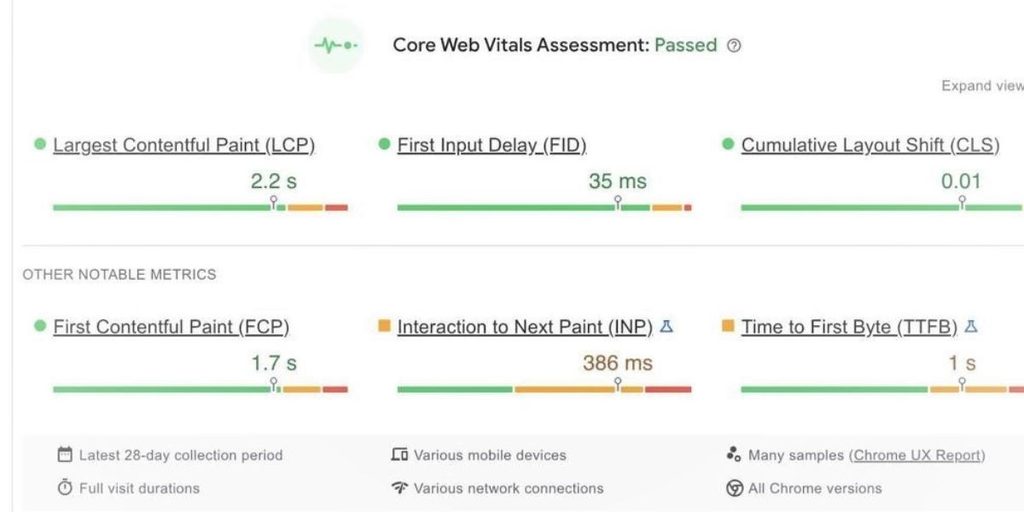
Page experience is worth improving for usability, and Google’s ranking systems use Core Web Vitals. However, achieving perfect performance scores does not guarantee better rankings.
You can begin by testing your website with Google’s free PageSpeed Insights tool.
It provides information about performance and suggests potential improvements.
Three important Core Web Vitals metrics are:
| Metric | Good threshold |
|---|---|
| Largest Contentful Paint (LCP) | 2.5 seconds or less |
| Interaction to Next Paint (INP) | 200 milliseconds or less |
| Cumulative Layout Shift (CLS) | 0.1 or less |
These thresholds help evaluate loading performance, responsiveness, and visual stability.
Free Ways to Improve Website Speed
Start by examining the images used throughout your website.
Uploading unnecessarily large image files can increase page weight and loading time.
Resize images to appropriate dimensions and consider modern formats such as WebP when supported.
Next, review your website’s plugins and scripts. Some WordPress websites use several plugins that provide overlapping functionality.
Removing unnecessary plugins may reduce resource usage, although the actual performance improvement depends on how those plugins operate.
You should also consider browser caching, unnecessary redirects, and the number of external scripts loaded on each page.
Make one change at a time and test again to understand whether it actually improves performance.
Free tool: Google PageSpeed Insights
7. Make Your Website Mobile-Friendly
A website should work properly across different screen sizes.
Google primarily uses the mobile version of a website’s content for indexing, making mobile accessibility particularly important.
A page that looks attractive on a desktop computer may still create difficulties for someone browsing on a smartphone.
For example, small text, overlapping buttons, horizontal scrolling, and intrusive pop-ups can make an otherwise useful article difficult to read.
Fortunately, improving mobile usability does not necessarily require hiring a web developer.
Many modern WordPress themes already include responsive layouts that adjust automatically to different devices.
However, you should still test individual pages because custom elements, advertising placements, embedded tables, and large images can create unexpected layout problems.
Open your website on a smartphone and examine the homepage, blog archive, individual articles, and contact page.
Check whether navigation menus work correctly and whether readers can access important information without unnecessary difficulty.
Pay particular attention to text readability and spacing between interactive elements.
If a table extends beyond the screen, consider using a responsive layout rather than forcing visitors to zoom out.
Mobile optimization should focus on making the entire browsing experience comfortable, not merely passing a technical test.
8. Build a Clear Internal Linking Structure
Internal links connect different pages within the same website.
They help visitors discover related information and allow search engines to find additional pages.
For example, imagine that you publish an article explaining how to improve website speed.
Within that article, you might naturally reference another guide about image compression or WordPress caching.
A relevant internal link allows readers to explore the subject in greater detail.
It also helps establish relationships between your articles.
However, internal linking should be purposeful.
Adding dozens of unrelated links to every article does not automatically improve SEO. Too many unnecessary links can distract readers and make your content harder to navigate.
Example of Natural Internal Linking
Suppose your website contains these three articles:
- How to Improve Website SEO for Free
- What Is Google Search Console?
- How to Find Low-Competition Keywords
The first article could link to the other two when discussing performance monitoring and keyword research.
Use descriptive anchor text that explains the destination.
For example, “learn how to use Google Search Console” is more informative than a generic phrase such as “click here.”
Periodically review older articles and add relevant links to newly published content.
This simple habit can improve navigation and help prevent valuable articles from becoming isolated within your website.
9. Fix Broken Links and Common Technical SEO Problems
Technical problems can prevent search engines from accessing your content correctly.
Some issues are difficult to identify without specialized knowledge, but many common problems can be detected using free tools.
Begin by checking whether important pages load successfully.
A broken internal link might direct readers to a page that has been deleted or moved without an appropriate redirect.
Similarly, an incorrect noindex directive can prevent an important article from appearing in search results.
Google Search Console provides useful information about crawling and indexing issues.
Pay attention to unexpected 404 errors, server errors, blocked resources, and canonicalization problems.
You should also check whether your website has an accessible XML sitemap.
A sitemap helps search engines discover URLs, particularly on websites with complex structures.
However, submitting a sitemap does not guarantee that every included page will be crawled or indexed.
Another important consideration is HTTPS.
Your website should use a valid SSL certificate so visitors can access pages through a secure connection.
When fixing technical issues, prioritize problems that affect important content rather than treating every warning as equally serious.
For example, an intentionally redirected URL is not necessarily a problem.
Understanding the reason behind each issue is more useful than blindly attempting to eliminate every notification.
10. Earn Relevant Backlinks Naturally
Backlinks are links from external websites pointing to your content.
They can help search engines discover pages and contribute to understanding relationships between websites.
However, not all backlinks are equally valuable.
A relevant editorial link from a trustworthy resource is different from hundreds of automatically generated links on unrelated websites.
Google considers certain link-building practices to be spam when their primary purpose is manipulating search rankings.
This includes buying or selling links for ranking purposes and participating in excessive link exchanges.
Instead of focusing on backlink quantity, create content that other people have a genuine reason to reference.
For example, a detailed tutorial with original screenshots may be useful to bloggers explaining the same subject.
A well-researched comparison or practical checklist may also attract natural references.
You can participate in relevant online communities, answer questions, and share useful resources where appropriate.
Avoid posting your website link repeatedly in unrelated discussions.
Building a trustworthy online presence takes time, but it is generally more sustainable than attempting to manufacture artificial popularity.
Official reference: Google’s Spam Policies
11. Update Existing Articles Regularly
Publishing new content is only one part of maintaining a useful website.
Older articles may contain outdated instructions, broken links, discontinued tools, or information that is no longer accurate.
Updating these pages can improve their usefulness and help readers access current information.
Start by reviewing Google Search Console to identify pages whose search performance has changed.
For example, suppose an article previously attracted consistent impressions but has experienced a decline over several months.
Examine the page carefully before deciding what to change.
The decline might be related to stronger competing content, changing search demand, technical issues, or information that no longer matches user expectations.
Review the article’s introduction, headings, examples, and factual accuracy.
Replace outdated screenshots and remove references to discontinued services where necessary.
You may also discover that readers now expect information that was not relevant when the article was originally published.
Adding genuinely useful sections can make the page more complete.
However, changing the publication date without making meaningful improvements is not a useful content strategy.
Likewise, updating every article simply because it is old is unnecessary.
Prioritize pages where revisions can provide measurable value to readers.
12. Track Your SEO Progress and Make Gradual Improvements
SEO should be treated as an ongoing process rather than a task you complete once.
After implementing improvements, monitor your website to understand what is working.
Google Search Console provides several useful performance indicators, including clicks, impressions, average position, and click-through rate.
Each metric answers a different question.
Impressions show how frequently your website appeared in eligible search results, while clicks indicate how often users selected your pages.
Average position provides additional context, although it should not be interpreted as a fixed ranking for every user or search.
You can also use Google Analytics 4 to understand visitor activity after people arrive on your website.
For example, you may discover that certain informational guides attract search traffic but that visitors rarely explore related articles.
This could indicate an opportunity to improve internal navigation or recommend relevant follow-up resources.
A Simple Monthly SEO Review
At the end of each month, review your website’s overall performance.
Compare the current reporting period with an appropriate previous period and examine whether changes appear meaningful.
Identify pages gaining visibility, pages losing traffic, and articles that may benefit from updates.
Avoid making major decisions based on only a few days of data.
Search performance naturally fluctuates, and changes in rankings can occur for reasons outside your control.
A consistent review process helps you make informed improvements rather than reacting to every small movement.
Common SEO Mistakes Beginners Should Avoid
Even when using free SEO methods, beginners sometimes make decisions that limit their progress.
One common mistake is targeting too many unrelated keywords within a single article. A page should have a clear primary purpose, even when it naturally covers several related questions.
Another mistake is publishing content without reviewing what already exists on the website. This can create multiple pages addressing nearly identical search intent.
Beginners also sometimes assume that installing an SEO plugin automatically optimizes their entire website.
Plugins can assist with technical settings, but they cannot replace accurate information, useful writing, and a logical website structure.
Other mistakes include ignoring mobile usability, publishing copied material, purchasing artificial backlinks, and expecting immediate results after every change.
Remember that successful SEO is not about finding one secret technique.
It involves improving multiple aspects of your website consistently.
A Practical 30-Day Free SEO Improvement Plan
If you are unsure where to begin, the following schedule can help organize your first month of work.
| Timeline | Main Activities |
|---|---|
| Week 1 | Set up Search Console, check indexing, review sitemap and important pages |
| Week 2 | Research relevant keywords and improve existing article quality |
| Week 3 | Optimize titles, internal links, mobile usability and website speed |
| Week 4 | Fix important technical issues, review performance and plan future content |
This schedule is flexible. A large website may require more time, while a smaller blog might complete several tasks within a few days.
The objective is to establish a repeatable improvement process rather than rush through a checklist.
Frequently Asked Questions
1. Can I improve my website’s SEO without paying for tools?
Yes. Many useful SEO activities can be completed using free resources such as Google Search Console, Google Trends, PageSpeed Insights, and manual content reviews.
Paid tools can simplify certain tasks, but they are not essential for learning or implementing basic SEO.
2. How long does free SEO take to show results?
There is no guaranteed timeline. Some technical changes may be processed relatively quickly, while broader improvements in search visibility can take several months or longer.
Results depend on competition, website history, content quality, and many other factors.
3. Is Google Search Console completely free?
Yes. Google Search Console is a free service that helps website owners monitor search performance, investigate indexing problems, and understand how their pages appear in Google Search.
4. How many keywords should I use in one article?
There is no fixed number. Focus on a clear primary topic and naturally include relevant terminology when it helps explain the subject.
Repeating a keyword unnecessarily does not make an article more useful.
5. Do I need backlinks to rank on Google?
Backlinks can contribute to search visibility, but there is no universal backlink requirement that every page must meet.
Creating useful content, maintaining technical accessibility, and satisfying search intent are also important.
Avoid artificial link-building schemes.
6. Does website speed affect SEO?
Google’s ranking systems use Core Web Vitals, but website performance is only one part of the broader search experience.
Improving loading speed can also make your website more comfortable for visitors.
7. Should I publish articles every day for better rankings?
No. Google does not require websites to publish daily.
A realistic publishing schedule that allows you to maintain accuracy, originality, and usefulness is generally preferable to producing large amounts of low-value content.
8. Can a new website compete with established websites?
Yes, although competition varies significantly between topics.
New websites can begin by targeting specific questions, providing original value, maintaining clear navigation, and gradually developing a useful collection of related content.
There is no guaranteed ranking strategy, but consistent improvements can create growth opportunities.
Conclusion
Improving your website’s SEO without spending money is possible, but it requires patience, consistency, and a willingness to learn.
You do not need to purchase expensive software to begin making meaningful improvements.
Start by understanding how Google Search works and connecting your website to Google Search Console. Then focus on identifying relevant topics, publishing genuinely helpful content, improving page titles, and maintaining a clear internal linking structure.
Technical improvements also deserve attention. A website that loads efficiently, works properly on mobile devices, and allows search engines to access important pages provides a stronger foundation for long-term growth.
Most importantly, avoid treating SEO as a collection of shortcuts.
Your goal should be to build a website that people can trust, navigate comfortably, and return to whenever they need useful information.
Consistent improvements, supported by reliable performance data, are more valuable than chasing temporary ranking tricks.