

Starting a blog in 2026 is easier than many people think. You do not need to be a professional writer, a web developer, or someone with years of experience. If you have a topic you want to share with others and are willing to learn, you can start building your own blog.
But let me explain something before we begin. Starting a blog and building a successful blog are two different things. You can create a website in a day, but getting readers, building trust, and earning money takes time and consistent effort.
If you want to start a blog, do not worry about everything at once. You do not need an expensive website or dozens of articles on your first day. You need to make the right decisions, understand your audience, and follow a clear plan.
In this guide, I will explain how to start a successful blog in 2026, step by step. We will cover choosing a niche, finding article ideas, selecting a blogging platform, setting up your website, writing helpful content, getting traffic from Google, promoting your articles, and exploring ways to earn money.
Let’s start with the first step.
1. Decide What You Want to Blog About
Before buying a domain or creating a website, decide what you want your blog to cover.
This is your first important decision because it affects the articles you write, the people you want to reach, and the direction of your website.
For example, imagine you enjoy learning about technology. You could start a blog that explains smartphone settings, fixes common computer problems, and helps beginners understand useful apps.
You could also start a home decor blog where you share room decoration ideas, furniture inspiration, and practical ways to improve small spaces.
Both ideas can work, but you should choose a subject that you can continue exploring and writing about.
Choose a Niche That Fits You
A blog niche is the main subject of your website. Instead of writing about everything, you focus on a particular topic or audience.
Here are some examples of blogging niches you could consider:
- Technology: Smartphone tutorials, computer problems, and app guides.
- Blogging: Website setup, content writing, and SEO tutorials.
- Home decor: Living room ideas, bedroom decoration, and small-space solutions.
- Fashion: Outfit ideas, seasonal trends, and clothing inspiration.
- Cooking: Easy recipes, cooking techniques, and meal planning.
- Education: Study tips, learning resources, and exam preparation.
- Digital marketing: SEO, social media marketing, and online advertising.
Do not choose a niche only because someone says it makes money. Think about whether you can understand the subject, research it properly, and create helpful articles about it over time.
You do not need to know everything before starting. You can learn as you go, but you must check your information before sharing it with readers.
How Do You Know If a Niche Is Suitable?
Ask yourself three simple questions.
First, can I think of at least 30 useful article ideas for this niche? Second, are people interested in learning about this subject? Third, can I offer information that is useful, accurate, or explained better than the resources I have already found?
If the answer to these questions is yes, you have a reasonable starting point.
You can also explore Google Trends and Google search suggestions to see what people are interested in. These tools help you discover ideas, although they do not guarantee that a topic will bring traffic.
My advice is to start with a clear focus. You can expand your blog later when you understand your audience better.
2. Understand Your Target Audience
Once you have selected a niche, think about the people who will read your blog.
Your target audience is the group of people you want to help through your content. Understanding these readers makes it easier to choose topics and explain things in a way they can understand.
For example, if you start a blog about website creation, your readers might be beginners who want to build their first website without hiring a developer.
They may have questions such as:
- How do I create a website?
- Which blogging platform should I choose?
- How much does it cost to start a blog?
- How can I get visitors from Google?
- Can I earn money from a new blog?
These questions give you ideas for useful articles.
Find Out What Your Readers Need
Start by searching for your niche on Google. Read the titles and headings of relevant articles. Look at the questions appearing in search results and notice which problems different websites are trying to solve.
You can also read relevant online communities, discussion forums, and social media comments to understand what people find confusing.
Do not copy other people’s articles. Instead, use your research to understand the questions readers have and then create your own explanation, examples, and solutions.
When you understand your audience, you are less likely to publish random articles that do not fit your website.
3. Find Blog Topics Before You Build Your Website
Now that you have a niche and an idea of your audience, start collecting article topics.
This step is important because many beginners create a website first and then struggle to decide what to publish.
You can avoid this problem by preparing a small content plan before launching your blog.
Use Free Tools to Find Ideas
You do not need to pay for expensive SEO software when you are just starting. Several free methods can help you discover potential topics.
Google Autocomplete: Open Google and type a phrase related to your niche. For example, type “how to start a blog” and look at the suggested searches. These suggestions can give you ideas about what people want to know.
People Also Ask: Search for your topic and review the related questions displayed in Google results. These questions may help you identify useful subtopics for your articles.
Google Trends: Compare interest in different topics and see how search interest changes over time. This is particularly useful for seasonal subjects and trending topics.
Competitor research: Visit websites that cover your niche. Look at their article topics and identify questions that are not explained clearly or problems that could use a more practical answer.
Remember that search suggestions and trends are research clues, not proof that a keyword receives a particular number of monthly searches.
Build Your First Topic List
Create a simple spreadsheet or document to organize your ideas.
For a blog about blogging, your first topics might include:
| Article topic | What the article should explain |
|---|---|
| How to Start a Blog in 2026 | The complete process of starting a blog |
| How to Choose a Blog Niche | How to select a suitable subject |
| How to Find Keywords for a Blog | How to research article topics |
| How to Write Your First Blog Post | How to plan and write an article |
| How to Get Traffic to a New Blog | Ways to attract your first readers |
| How to Monetize a Blog | Different ways to earn from blogging |
Notice how these topics are related. Someone who wants to start a blog may also need help with keyword research, writing, traffic, and monetization.
This gives your website a clear direction and helps you plan useful internal links between related articles.
4. Choose the Right Blogging Platform
After planning your topics, decide where you will build your blog.
A blogging platform is the software or service you use to create pages, publish articles, manage images, and organize your website.
There are several options, but beginners often consider Blogger, WordPress.com, and WordPress.org.
WordPress.org
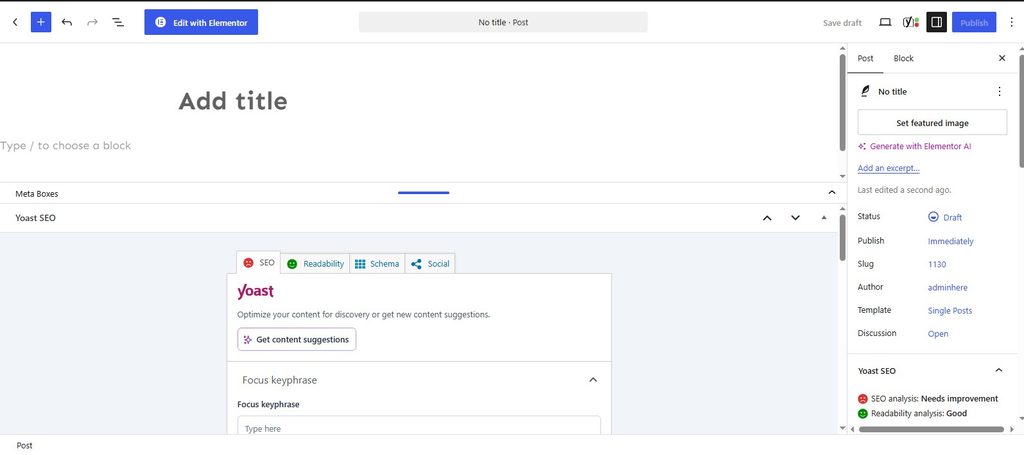
WordPress.org is a self-hosted publishing platform. You install WordPress through a hosting provider and manage your website using its dashboard.
You can choose themes, install plugins, customize your design, and organize your content according to your needs.
However, you will generally need a domain name and a hosting plan. You are also responsible for keeping your website maintained and secure.
This option can be suitable if you want more control over your blog and plan to develop it over time.
Blogger
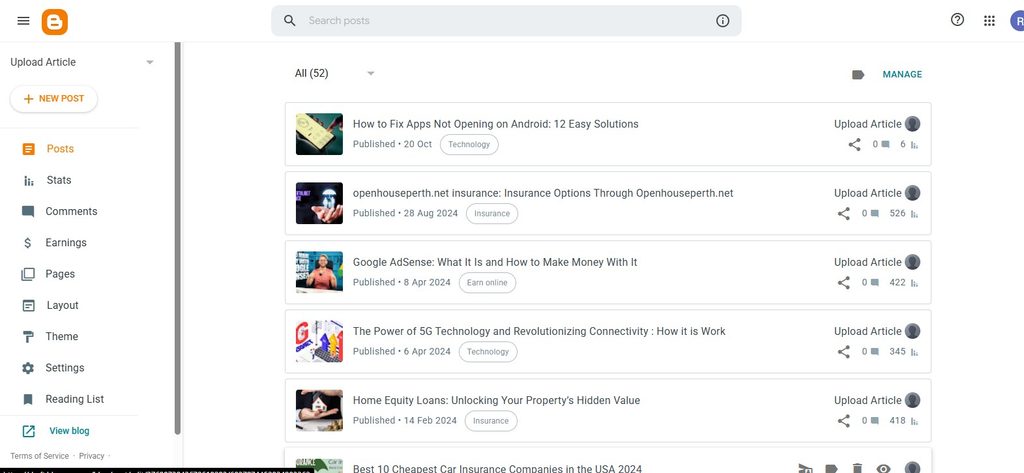
Blogger is a hosted blogging service that allows you to publish articles without purchasing separate web hosting.
It can be a practical starting point if you want to learn the basics of blogging while keeping your initial costs low.
However, you should review its available features, customization options, and limitations before deciding whether it suits your long-term plans.
WordPress.com
WordPress.com provides a hosted website service with different plans and features. The amount of customization and access you receive depends on the plan you choose.
It may suit people who prefer a managed platform rather than handling hosting themselves.
Which Platform Should You Choose?
There is no single platform that is best for everyone.
If you want to experiment with blogging on a limited budget, Blogger may be enough to get started. If you want greater control over website design, plugins, and future development, self-hosted WordPress is worth considering.
Before choosing, compare the current costs, available features, maintenance requirements, and options for exporting your content.
Do not spend weeks comparing platforms. Choose one that fits your needs and move on to building your blog.
5. Choose a Domain Name and Hosting Plan
If you choose self-hosted WordPress, your next step is to select a domain name and hosting service.
Your domain name is your website’s address, such as example.com. Hosting is the service that stores your website’s files and makes them accessible to visitors.
Some providers offer a domain and hosting together, while others sell them separately.
How to Choose a Good Domain Name
Choose a name that is easy to remember, spell, and type.
For example, if your blog focuses on home decoration, you could choose a brand name that reflects your subject or gives you room to cover different aspects of home decor.
Avoid unnecessarily long names, confusing spellings, and names that are too similar to established brands.
You do not have to put your main keyword in the domain name to rank in Google. A recognizable brand name can work perfectly well.
Before purchasing a domain, check its availability, renewal price, and any relevant trademark concerns.
How to Select a Hosting Provider
Hosting is important because your website needs to remain accessible and perform reliably.
Before choosing a hosting plan, check:
- Website uptime and reliability.
- Customer support availability.
- Backup and restoration options.
- Security features and software updates.
- Storage limits and expected website traffic capacity.
- Introductory prices and renewal charges.
You do not need the most expensive hosting package for a new blog. Start with a suitable plan and upgrade when your website’s actual needs increase.
If you choose Blogger or another hosted service, separate hosting may not be necessary.
6. Set Up Your Blog and Create a Simple Design
Once you have selected your platform and arranged your domain and hosting, it is time to build the website.
If you use WordPress, install it through your hosting dashboard if your provider offers that option. Then log in to your WordPress administration area and choose a suitable theme.
A theme controls much of your website’s appearance, including its layout, typography, and visual elements.
You do not need a premium theme to begin. A well-maintained free theme can provide everything you need for a simple blog.
Keep Your Website Easy to Use
Imagine someone visits your website for the first time. They should be able to understand what your blog covers, find the main categories, and open an article without confusion.
Use readable fonts, appropriate spacing, clear headings, and a simple navigation menu.
Make sure the website also works on mobile devices. Many readers browse articles on their phones, so your text, images, menus, and buttons should fit smaller screens properly.
Avoid adding unnecessary animations, pop-ups, and widgets. A clean design is often more useful than a complicated one.
Create the Essential Pages
Before publishing many articles, prepare the main pages that help readers understand your website.
About page: Explain what your blog covers, who it is for, and why you created it.
Contact page: Give readers a practical way to contact you.
Privacy Policy: Explain the personal information and data your website collects and how it is used, including relevant analytics and advertising practices.
Terms or Disclaimer page: Add these where appropriate for your website and the content you publish.
Make sure these pages accurately describe your actual practices. Do not copy a policy without checking whether it applies to your website.
If you plan to apply for an advertising program such as Google AdSense, review its current publisher requirements and policies. Creating these pages alone does not guarantee approval.
7. Plan Your First 10 Blog Articles
Your website is ready, but what should you publish first?
Instead of writing about random subjects, prepare your first 10 article ideas. These articles should be closely related to your niche and useful to your intended readers.
For example, if you have started a home decor blog, you could write about small living room ideas, bedroom color combinations, affordable decoration tips, storage solutions, and furniture arrangements.
If your niche is technology, you might focus on smartphone troubleshooting, useful apps, computer basics, and common software problems.
The important thing is to give readers a clear reason to visit your website.
Organize Articles Into Categories
Suppose you run a blogging website. You could organize your articles into categories such as:
- Blog Setup
- Keyword Research
- Content Writing
- SEO
- Blog Monetization
These categories make it easier to organize related content and help readers explore your website.
You can also link relevant articles to each other. For example, an article about writing your first blog post could link to a guide about keyword research.
However, do not create multiple articles that answer almost the same question. If two ideas overlap heavily, consider combining them into one more useful guide.
Follow a Realistic Publishing Schedule
You do not need to publish five articles every day to succeed.
Choose a schedule that gives you enough time to research, write, edit, and check your information. One useful article each week can be a reasonable starting goal if that fits your available time.
Consistency helps you build a routine, but quality and usefulness matter more than following an arbitrary publishing target.
8. Write Your First Blog Post in Simple Language
Now comes the part that many new bloggers find difficult: writing an article.
You may have a topic in mind but not know how to turn it into a complete post. The easiest way is to start with the question your reader wants answered.
For example, if your topic is “How to Start a Blog,” your article should explain the process in an order that makes sense to a beginner.
Begin with choosing a niche, move to selecting a platform, explain the website setup, and then cover writing, SEO, promotion, and monetization.
This way, the reader can follow the process without having to guess what to do next.
Write an Introduction That Gets to the Point
Your introduction should explain what the article will help the reader do.
Avoid spending several paragraphs discussing how important the topic is. Readers usually want to understand whether your article answers their question.
For example, you could begin by acknowledging that starting a blog may feel confusing, then explain that the guide will walk them through the process step by step.
Use Headings and Short Paragraphs
Break the article into sections with clear headings. Each section should explain one main idea.
Use examples when a concept might be difficult to understand. If you mention a technical term, explain what it means instead of assuming every reader already knows it.
Write as if you are explaining the subject to someone who is learning it for the first time.
Add Information That Makes Your Article Useful
Before publishing, ask yourself whether the article actually solves the reader’s problem.
Could you include a practical example, a checklist, a comparison table, a demonstration, or a common mistake to avoid?
For example, an article about keyword research could include sample search queries and explain how to turn one query into an article outline.
Do not add extra paragraphs simply to increase the word count. A shorter article that fully answers the question can be more useful than a long article filled with repetition.
Review Your Article Before Publishing
Read the complete article again and check for spelling errors, confusing explanations, repeated information, and unsupported claims.
Verify dates, statistics, product information, and external references where relevant.
If you use AI tools for brainstorming, outlining, or editing, review the final article yourself. You remain responsible for making sure the information is accurate, original, and genuinely useful.
9. Learn Basic SEO to Help People Find Your Blog
Writing a useful article is important, but people also need a way to discover it.
Search engine optimization, or SEO, helps search engines understand your website and its content. It can improve your chances of appearing in relevant search results, although no SEO method guarantees a particular ranking or amount of traffic.
You do not need to learn every advanced SEO technique before launching your blog. Start with the basics.
Choose a Relevant Keyword
A keyword is a word or phrase that describes what someone is searching for.
For example, someone who wants to start a website might search for “how to start a blog for beginners.”
Your article should address the question behind that search rather than simply repeat the phrase throughout the text.
Research the topic, examine the search results, and identify what information a useful article should include.
Write a Clear SEO Title
Your title should tell readers what the article is about.
For example:
“How to Start a Successful Blog in 2026: A Beginner’s Guide”
This title clearly describes the topic and identifies the intended audience.
Use your main keyword naturally where it fits. Avoid repeating the same phrase several times in an attempt to influence rankings.
Organize Your Headings
Use one clear main heading for the article and descriptive subheadings for its sections.
For a beginner’s blogging guide, headings might cover niche selection, platform choices, website setup, writing, SEO, and promotion.
A logical heading structure helps readers scan the article and find the information they need.
Add Internal and External Links
Internal links connect one page of your website to another. They help readers discover related information and can help search engines understand the relationships between your pages.
For example, your blogging guide could link to a separate article about finding keywords.
External links can direct readers to reliable sources that support important claims or provide additional information.
Only add links when they are relevant and useful.
Set Up Google Search Console
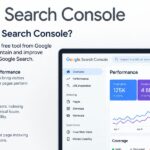
Google Search Console is a free tool that helps you monitor how your website performs in Google Search.
After setting up your website, verify ownership in Search Console and submit your XML sitemap if your platform provides one.
You can then review indexing information, search queries, impressions, clicks, and potential website issues.
Remember that submitting a sitemap does not guarantee that every page will be indexed or ranked.
For more guidance, read Google’s official SEO Starter Guide.
10. Make Your Website Fast, Secure, and Mobile-Friendly
Your blog should be easy to use, whether someone visits from a phone, tablet, or computer.
Start by opening your website on different screen sizes. Check that the text is readable, the navigation works, and images do not overflow their containers.
If you use WordPress, keep your theme and plugins updated. Install only the plugins you actually need because unnecessary tools can make the website harder to maintain.
Improve Website Speed
Large images, excessive scripts, and poorly configured website components can affect loading performance.
Compress images before uploading them and use suitable image formats where supported. Avoid placing large media files on every page unless they serve a clear purpose.
You can test your website using Google PageSpeed Insights to identify potential performance improvements.
Do not assume that every warning requires an immediate redesign. Focus first on issues that meaningfully affect loading, usability, or access to your content.
Protect Your Website
Use HTTPS, maintain regular backups, and keep your website software updated.
If something goes wrong, a recent backup can help you restore your website. Also, use strong passwords and take appropriate steps to protect your administration account.
These basic habits can prevent avoidable problems as your blog grows.
11. Publish Your Blog and Start Promoting It
Once your website is working and you have prepared useful content, start sharing your articles with the people who may benefit from them.
Do not expect every new article to receive visitors immediately. A new website has little history, and readers may not know it exists yet.
The goal is to help the right people discover your content.
Share Articles on Relevant Social Platforms
Choose platforms that suit your niche and audience.
For example, a home decor blog may benefit from Pinterest because readers often use it to discover room ideas and visual inspiration.
A technology blog may find relevant audiences in technology communities, while a professional digital marketing blog might share useful insights on LinkedIn.
Create posts that explain what readers will gain from your article. Avoid repeatedly sharing links in unrelated discussions or sending unsolicited promotional messages.
Build an Email Newsletter
An email newsletter gives interested readers a way to hear from you when you publish new content.
You can start with a simple signup form and send occasional updates featuring new articles or useful tips.
Be transparent about how subscribers will receive emails, follow applicable consent and privacy requirements, and provide an appropriate unsubscribe option.
You do not need thousands of subscribers to begin learning what your readers find valuable.
Participate in Relevant Communities
Join communities where people discuss your subject. Answer questions when you can genuinely help, learn from common problems, and use those discussions to identify new article ideas.
Share your website only when it is relevant and permitted by the community’s rules.
Promotion should support your content strategy, not replace it. Your articles should remain useful even after the original social media post is no longer being seen.
12. Track Your Blog’s Progress
If you want to build a successful blog, you need to understand what is working and what needs improvement.
You do not have to check statistics every hour. Review your website’s progress regularly and use the information to make better decisions.
Use Google Search Console
Search Console can help you understand which queries show your pages in Google Search and how often people click on them.
For example, you may discover that an article appears for a question you had not considered when writing it. That information could help you improve the article or create a related guide.
Use Website Analytics
An analytics tool can help you understand how people arrive at your website and how they interact with its pages, depending on the tool and its configuration.
Look for useful patterns rather than focusing only on total visitor numbers.
Which articles attract relevant readers? Which pages help visitors explore more of your website? Are important pages difficult to find?
Use these observations to decide what to improve next.
Update Content When Necessary
Blogging does not end when you publish an article.
Over time, some information becomes outdated, links stop working, and readers may need additional explanations.
Review older posts when there is a meaningful reason to update them. Correct inaccurate information, add useful details, and remove material that no longer helps the reader.
You do not need to change an article simply because it is old. Make updates when they improve accuracy, relevance, or usability.
13. Understand How to Earn Money From Blogging
Many people start blogs because they eventually want to earn an income. This is possible, but monetization depends on your audience, niche, content quality, business model, and ability to reach interested readers.
You should focus on building a useful website first rather than expecting immediate income.
Earn Through Display Advertising
Advertising programs such as Google AdSense allow eligible publishers to display advertisements and potentially earn revenue.
However, approval is not automatic. Your website must meet the applicable eligibility requirements and publisher policies.
Before applying, make sure your content offers genuine value, your website is usable, and your pages comply with the program’s rules.
Never click your own ads, encourage artificial clicks, or buy traffic intended to generate invalid advertising activity.
Try Affiliate Marketing
Affiliate marketing allows you to recommend relevant products or services through special tracking links.
If someone makes a qualifying purchase through your link, you may receive a commission.
For example, a photography blog could review cameras or editing tools, while a technology blog might explain the features of useful software.
Make recommendations honestly, explain relevant limitations, and disclose affiliate relationships where required.
Do not recommend a product simply because its commission is high.
Sell Products or Services
Some bloggers eventually earn money by selling their own products or services.
Depending on your niche, these might include digital guides, downloadable templates, online courses, consulting, or professional services.
For example, a blog about website management could offer a practical website checklist or a service related to its readers’ needs.
Choose a monetization method that makes sense for your audience. Your articles should remain helpful even when a reader does not purchase anything.
14. Common Blogging Mistakes You Should Avoid
You can save time by learning from mistakes that frequently affect new bloggers.
Choosing a niche only for money: A supposedly profitable niche may be difficult to cover well. Select a subject you can research and explain consistently.
Copying other websites: Competitor research is useful, but copying text or simply rewriting existing articles without adding value will not give readers a strong reason to visit your website.
Publishing without research: Before writing, understand the reader’s question and check whether your article provides a useful answer.
Expecting instant traffic: Search visibility and audience growth can take time. Keep improving your website instead of judging its potential after a few days.
Obsessing over website design: A clean, functional design is enough to begin. Spend more time improving your content than repeatedly changing colors, fonts, and layouts.
Using too many plugins: Install tools only when they serve a clear purpose. Too many plugins can increase maintenance work and create potential compatibility or security issues.
Ignoring older articles: Review outdated information when an update would help readers.
Publishing inaccurate information: Check important claims, especially when readers may rely on your content to make health, financial, legal, or safety decisions.
Focusing only on monetization: If every article exists mainly to display advertisements or promote products, readers may struggle to find genuine value.
Avoiding these mistakes will not guarantee success, but it can help you build a more useful and sustainable blog.
15. Your First 30 Days: A Simple Blogging Plan
If you are not sure where to begin, use this 30-day plan as a starting point. Adjust the schedule to your available time and the amount of research your niche requires.
| Days | What to do | Your goal |
|---|---|---|
| 1–5 | Choose a niche and define your audience | Know what your blog will cover |
| 6–10 | Research topics and select a platform | Prepare your first content plan |
| 11–15 | Set up your website, design, and essential pages | Build a usable blog |
| 16–22 | Write, edit, and publish useful articles | Create your initial content |
| 23–26 | Check SEO, mobile usability, and security | Improve the website experience |
| 27–30 | Set up analytics and begin promotion | Start learning how people discover your blog |
You do not have to complete every task on the exact day listed. Some websites require more technical work, and some subjects need additional research.
The purpose of this plan is to help you make steady progress instead of feeling overwhelmed.
At the end of the first month, you should have a clearer website direction, a working blog, useful initial content, and a plan for what to do next.
Frequently Asked Questions
1. Can I start a blog for free in 2026?
Yes. Platforms such as Blogger allow you to start publishing without paying for separate web hosting. Other platforms may offer free plans with certain limitations.
If you want a custom domain or more advanced features, you may need to pay for additional services. Check the current terms and costs before choosing.
2. How much money do I need to start a blog?
The cost depends on your platform and the features you want.
A free hosted platform may allow you to start without paying for hosting. A self-hosted WordPress website generally requires a domain and hosting plan.
You can keep your initial expenses low by using a suitable free theme and avoiding unnecessary paid tools.
3. How many articles should I publish when starting a blog?
There is no fixed number of articles required to launch a blog.
Start with a small collection of useful, well-prepared posts and continue publishing as you develop your content plan.
Each article should serve a clear purpose and help your intended audience.
4. How long does it take for a new blog to get traffic from Google?
There is no guaranteed timeline. Some pages may appear in search results relatively quickly, while meaningful traffic growth may take months or longer.
Your results depend on several factors, including content quality, competition, topic demand, indexing, and how well your articles answer users’ questions.
5. Which blogging platform is best for beginners?
It depends on your goals and budget.
Blogger can be a practical choice for a simple start, while self-hosted WordPress offers greater control over website customization and management.
Compare the features, costs, maintenance requirements, and content export options before deciding.
6. Can I use AI to write blog articles?
Yes, AI tools can assist with topic research, brainstorming, outlining, and editing.
However, you should check the accuracy of the information, improve the explanation, add useful examples, and make sure the final article genuinely helps readers.
Avoid publishing large amounts of unhelpful content simply to try to manipulate search rankings.
7. Can a new blog get Google AdSense approval?
A new blog may be eligible for AdSense if it meets the applicable requirements and publisher policies.
There is no guaranteed approval based on a particular article count or word count. Focus on original, useful content, a good user experience, and compliance with the current program policies.
8. Should I focus on SEO or social media first?
Both can help people discover your content.
SEO helps you work toward visibility in relevant search results, while social media can introduce your articles to interested audiences.
Choose your initial priorities based on your niche, available time, and the platforms your intended readers use.
9. Do I need to publish articles every day?
No. There is no universal daily publishing requirement for a successful blog.
Choose a schedule that allows you to research topics properly and publish useful content consistently. A manageable routine is better than publishing rushed articles simply to meet a daily target.
10. Can blogging become a long-term source of income?
It can, but income is not guaranteed.
Building an audience, developing trust, creating useful content, and choosing suitable monetization methods all take effort. Results vary from one blog to another, so treat blogging as a long-term project rather than a promise of quick money.
Conclusion: Start Small, Keep Learning, and Improve Your Blog
Starting a successful blog in 2026 does not mean you have to do everything perfectly from day one. What matters is having a clear direction and taking practical steps to build your website.
First, choose a niche you can cover properly. Understand the people you want to help and research the questions they ask. Then select a suitable blogging platform, set up your website, and organize your content so visitors can find what they need.
Once your blog is ready, focus on writing useful articles in simple language. Learn basic SEO, make your website easy to use on mobile devices, and share your content with relevant audiences. As your website grows, use Search Console, analytics, and reader feedback to understand what is working.
Do not become discouraged if your first articles receive little traffic. A new blog needs time to develop, and there is no guaranteed formula for rankings or earnings. Instead of looking for shortcuts, concentrate on improving the information you publish and the experience you provide to readers.
You also do not need to spend money on every available tool. Start with the resources you can afford, learn the basics, and invest in additional features only when they serve a genuine purpose.
Most importantly, remember why you started your blog. If you want people to read your content, give them a useful reason to visit. Answer their questions, explain difficult topics clearly, and keep your information accurate.